1. Giftnote API
How to authenticate against the Giftnote Merchant API with a Bearer token, the gift-cards endpoint, and the 60-request token-bucket rate limit.
Written By Giftnote Admin
Last updated About 22 hours ago
You only need this page if you or your developer want to pull your Giftnote gift card data into your own systems. The Giftnote Merchant API lets them list your gift cards using a secure token. You'll find your token in the Giftnote app under Settings → Development → Merchant API → Manage API.
Before you start: the Giftnote API is on the Professional plan.
Agency or developer? If you're setting Giftnote up for a client and want a development sandbox to build and test in, email support@giftnote.com and we'll set one up for you.
Enabling the API
The Merchant API is off by default for every shop. Open Settings → Development and select Manage API on Merchant API. Switch on Enable Merchant API and save before you generate a token. While it's off, every request gets a 403, even with a valid token. The How to integrate section on that page lists the same four steps: turn on the Merchant API, generate a token, call the API with the token, and page through while staying under the limit.
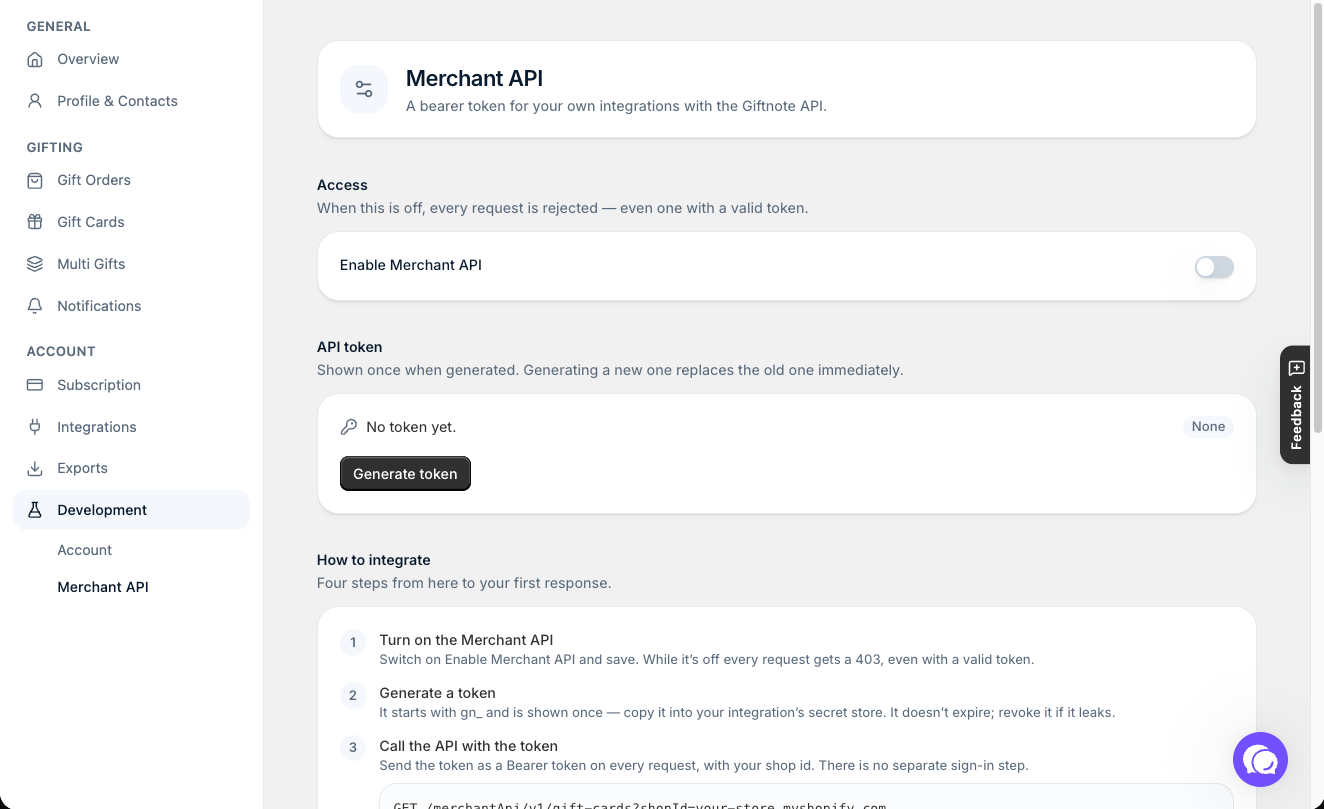
Generating a token
- Click Generate token. Giftnote shows the full token once, so copy it straight away. Giftnote only stores a scrambled version (a hash), so it can't show it again.
- Tokens look like
gn_<random>and do not expire on a timer. Click Revoke to invalidate the current token (for example, if it leaks) and generate a new one.
Keep your token secure. Do not share it or expose it in client-side code.
Authentication
There is no separate OAuth token-exchange step. Send your generated token directly as a Bearer token on every request:
Authorization: Bearer gn_<your-token>
API usage
Endpoint: /merchantApi/v1/gift-cards. The How to integrate section on the Merchant API page shows a full example request for your store.
GET /v1/gift-cards
Lists gift cards for your shop.
GET /merchantApi/v1/gift-cards?shopId=<your-shop-id>
Headers: Authorization: Bearer gn_<your-token>
Query parameters:
shopId: required. Your shop id, which is your store's myshopify.com address (for exampleyour-store.myshopify.com).limit: 1 to 100, default 50page: pagination cursor from a previous response'snext_pagecreated_min/created_max: ISO date bounds
Example successful response:
{
  "giftCards": [ { "id": "...", "status": "...", "balance": 0, "currency": "USD", "last4": "...", "recipientEmail": "...", "createdAt": "..." } ],
  "count": 1,
  "next_page": null,
  "quota": { "remaining": 59, "limit": 60 }
}
Rate limits
Each shop has a token-bucket quota of 60 requests, refilling at 1 request/second. The response includes X-RateLimit-Remaining and X-RateLimit-Limit headers, and a 429 with a Retry-After header once exhausted.
If you built against the previous Giftnote API
The previous API has been replaced. Update any existing integration:
- No token exchange. The
POST https://api.giftnote.com/auth/oauth/tokenstep (Basic auth withclient_id:api_token,grant_type=client_credentials) is gone. Send your generated token directly as the Bearer token. - No hourly expiry. Access tokens no longer expire after one hour. A token stays valid until you revoke it.
- New base URL and version.
https://api.giftnote.com/[collection]/v0/is replaced by the versioned endpoint/merchantApi/v1/gift-cards. - New quota. The flat 10 requests per hour is replaced by the 60-request token bucket above.
- New location. Credentials moved from Settings → Integrations → Giftnote API to Settings → Development → Merchant API → Manage API. Store the new token where your integration kept its Client ID and API token, and pass your shop id as
shopId. Once it works, remove the old Client ID and API token.
Related articles
Still need help? Share an idea